
Tempo AI Assistant
 By Adam on Mar 3, 2026
 ℹ️ Tempo AI is included with both SongBoard Free and SongBoard Plus.
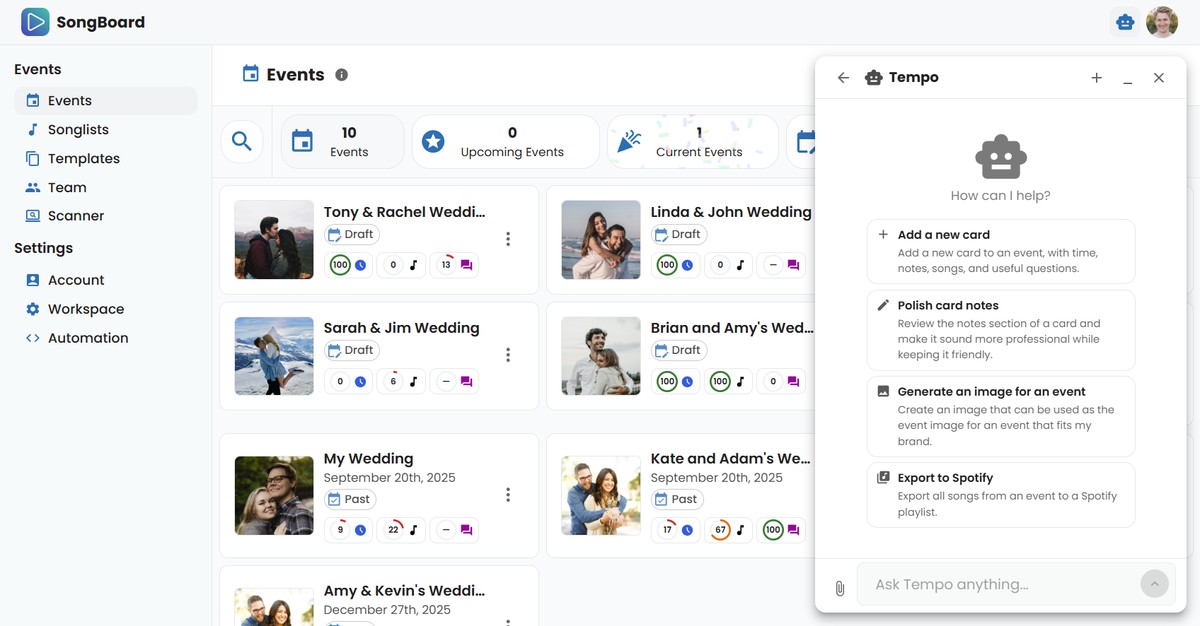
Tempo AI is SongBoard's built-in AI agent for DJs.
That means it does more than "chat". Tempo can actually help you do real planning work, inside your SongBoard workflow:
- build event structures (like full wedding timelines)
- add cards, questions, and notes
- summarize what still needs attention
- import planning files (like PDFs / VIBO exports)
- export songs to Spotify
- invite hosts and generate links
- generate event images
- and a lot more
If you have ever wished you had a planning assistant who lives inside your DJ workflow, this is it.
What is an AI agent (and how is it different from ChatGPT)?
ChatGPT and Claude are great for writing. You can ask them to draft emails, MC scripts, questionnaires, or rewrite your notes.
Tempo is different because it is connected to your SongBoard events.
So instead of generating text that you then copy into your event manually, Tempo can:
- create the cards
- place them in the right sections
- add questions where your hosts will actually answer them
- organize everything in the same place you already plan events
In short: ChatGPT writes. Tempo plans and does actions inside SongBoard.
Free vs Plus (Tempo AI)
- Free: Tempo can answer questions, suggest what to do next, and help you plan.
- Plus: Tempo can do all of that, and also apply changes for you (create events, add/update cards, polish notes, import PDFs, export playlists, etc).
⚠️ On the Free plan, Tempo can guide you and make suggestions. On Plus, Tempo can actually apply changes for you (with approval first).
How to use Tempo AI
1) Open Tempo
- Click the robot icon 🤖 in your SongBoard workspace
- Keyboard shortcut: Ctrl+. on Windows (Cmd+. on Mac)
2) Ask in plain language
You can keep it short. Tempo does not need "prompt engineering".
Examples:
- "Build out a full wedding board with practical cards, notes, and questions."
- "Add a new card for private last dance with questions I should ask."
- "Summarize this event and tell me what still needs attention."
- "Import this PDF and map the timeline and songs into SongBoard."
- "Export all songs from this event to Spotify."
3) Approve actions (when needed)
When Tempo is about to do a bigger action (creating an event, importing a PDF, exporting to Spotify, applying edits across multiple cards), it will ask for approval first.
This is intentional. You stay in control.
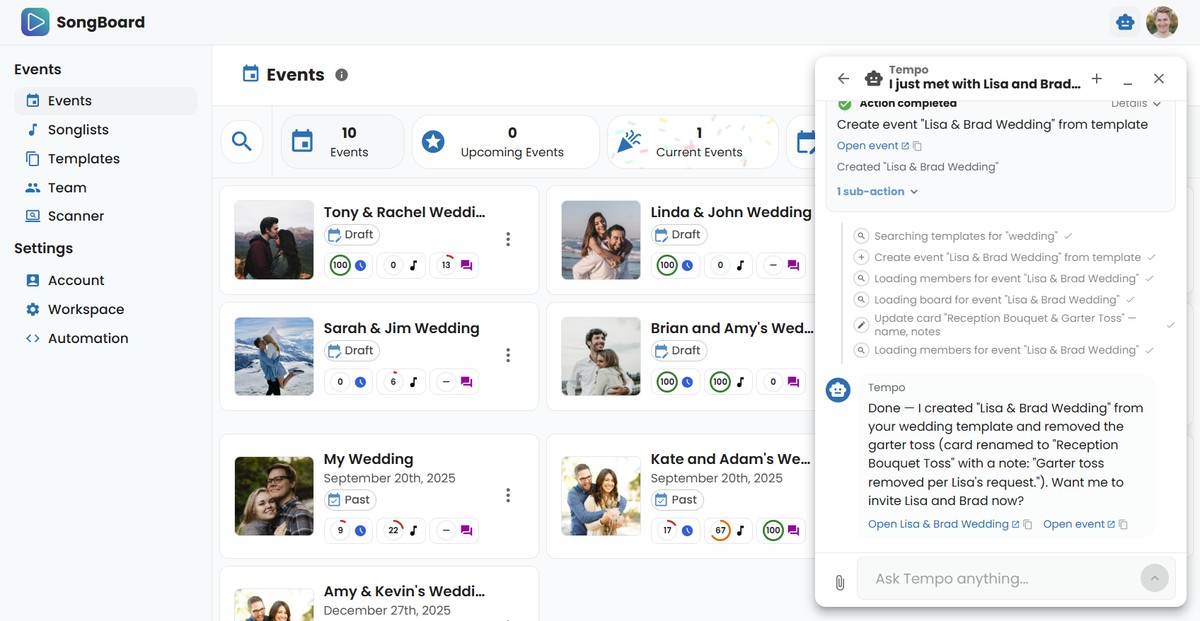
4) Refresh if you are already on the page that changed
If Tempo updates something on the page you are currently viewing, you may need to refresh to see the changes immediately.
(We know. We are improving this 😅)
A quick example conversation
Here is an example of asking Tempo to create a wedding plan. Tempo suggests starting from a template, then builds the full structure for you.
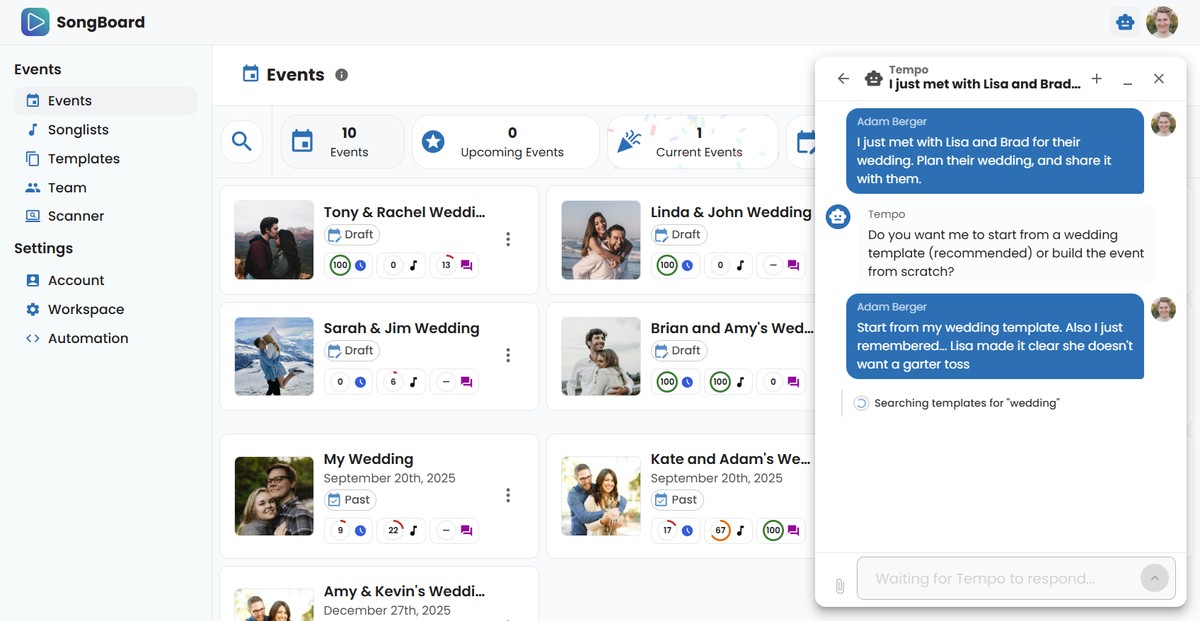
Full conversation example:
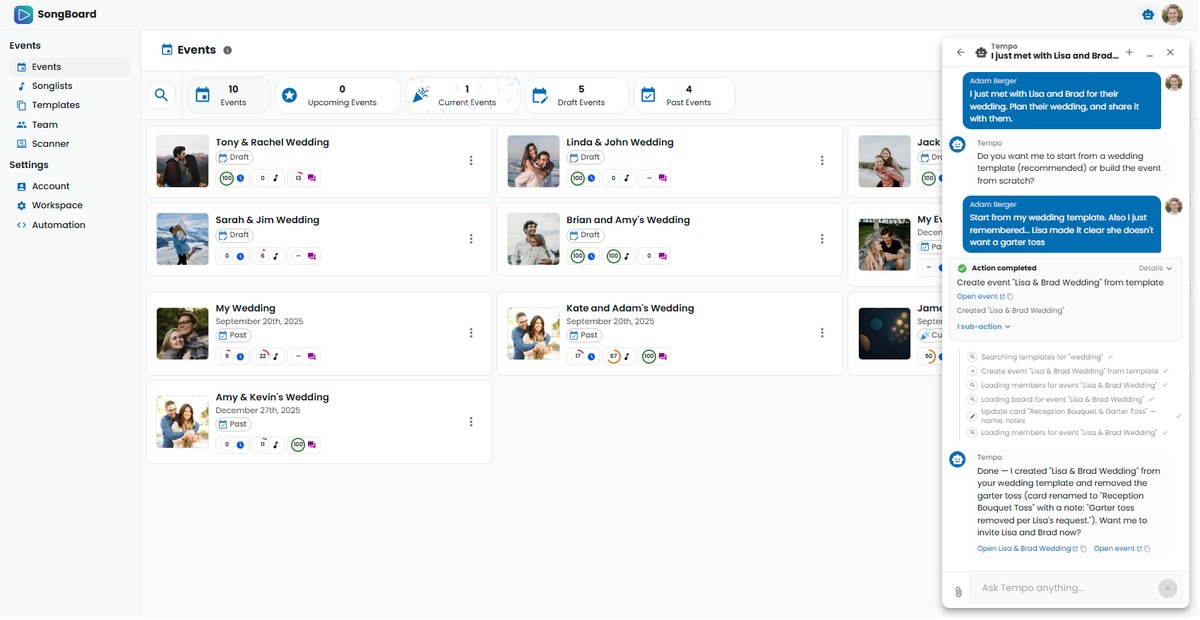
Tempo can tailor events based on host decisions
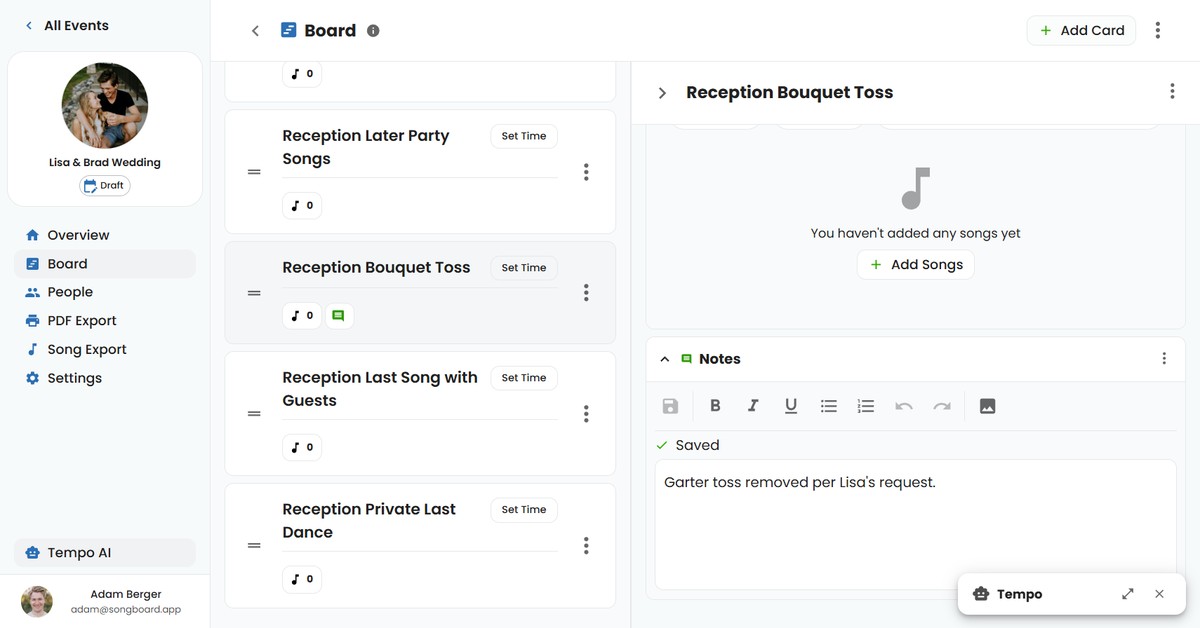
Tempo is not just a "timeline generator". It can also reflect host decisions into the plan.
Example: the host says they do not want a garter toss. Tempo can remove the section and leave a note so you do not forget on event day.
Prompts Ideas for DJs to use with Tempo AI
Here are some of the most useful prompts DJs use over and over.
Create an event template
"Create an event template for me for my event type, with practical cards, notes, and questions."
Summarize an event
"Tell me everything I need to know about this event and highlight anything that still needs attention before sharing with the host."
Add a new card
"Add a new card to this event, with time, notes, songs, and useful questions."
Polish card notes
"Review the notes section of this card and make it sound more professional while keeping it friendly."
Add card questions
"Add some useful planning questions to this card so the host gives us everything we need."
Export to Spotify
"Export all songs from this event to a Spotify playlist."
Import from PDF / VIBO
"Import an event from another source like a PDF or VIBO and map the timeline and songs into SongBoard."
Add a host
"Add a host to this event and give me the invite link for them."
Generate an image for an event
"Create an image that can be used as the event image for this event that fits my brand."
Uploading files to Tempo
Yes, you can drag-and-drop files into Tempo.
Common uses:
- importing an event from a PDF
- migrating a VIBO export
- bringing in planning docs that you want mapped into SongBoard
If Tempo needs clarification, it will ask follow-up questions before doing anything destructive.
FAQ
What is an AI agent for DJs?
An AI agent for DJs is a bot that helps DJs speed up timeline setup, planning questions, song organization, and event updates. It can carry out full tasks like creating events, inviting your hosts, and exporting events for your DJ software. SongBoard provides this through Tempo, its built-in AI assistant.
How is SongBoard different from other AI tools?
Generic AI tools (like ChatGPT or Claude) can generate text, but SongBoard + Tempo can perform DJ planning actions inside your workflow, including updating events and sections, generating playlists, exporting your events to PDF + Spotify and much more.
Can Tempo help with wedding DJ planning?
Yes. Tempo is especially useful for wedding DJ planning, including creating full wedding timelines, adding wedding specific questions, adding important notes, and collaborating with brides and grooms.
Does Tempo replace the DJ?
No. Tempo handles repetitive planning work and helps you move faster, but DJs stay in control of decisions, performance quality, and final review.
Is SongBoard safe for AI-assisted edits?
Yes. Tempo uses approval-first actions for write operations, so you can review and approve updates before they are applied.
Which DJs should use an AI agent?
AI agents are great for wedding DJs, mobile DJs, and DJ teams who want to reduce planning hours, improve consistency, and ultimately deliver better events for their hosts.
Can I use SongBoard for non-wedding events too?
Absolutely. SongBoard works for weddings, corporate events, private parties, school dances, and other DJ event formats.
Can I use AI features on the free plan?
Yes. SongBoard offers a free plan that comes with Tempo AI. You will need to upgrade to the Plus plan to have Tempo make changes to your events.
How many tokens do I get with Tempo AI?
Tempo AI comes with 1,000,000 tokens per month. This is more than enough for most DJs to create and edit dozens of events per month. If you need more tokens, email support@songboard.app and we can add more.
I ran out of tokens... can I get more? 🙏
Send an email to support@songboard.app asking for more tokens and we can extend your token quota.
Can Tempo generate images for me?
Yes. Ask Tempo to create an image and it can assign it as the image for an event (and more).
Can Tempo AI replace my event review?
Tempo speeds up planning, but you should still do a quick review before sending events to hosts.
Does Tempo AI work for existing events?
Yes. You can use Tempo to improve and update events you already created.
Do I need to install anything?
No. Tempo is built directly into SongBoard.
If you need help with Tempo AI, contact support@songboard.app and we'll help you get set up.
© 2026 SongBoard. SongBoard is a trademark of SongBoard LLC. All rights reserved.