
How to Plan Music for Any Event: A DJ's Guide [2026]
 By Adam on Apr 5, 2026
 ![How to Plan Music for Any Event: A DJ's Guide [2026]](/blog/event-music-planning/cover.jpg)
Plan Your Next DJ Event with SongBoard
SongBoard makes DJ event planning simple. Your hosts pick the songs they want to hear, share the schedule, and more. So you can focus less on logistics and more on DJing.
Every event runs on music. The cocktail hour vibe, the dinner energy, the moment the dance floor opens up—all of it depends on having the right songs at the right time. And yet, most DJs still plan music through a mix of Spotify playlists, text threads, email chains, and notes scattered across three apps.
It works until it doesn't. A couple forgets to send their must-play list. A corporate client mentions a "do not play" request in an email you can't find. A guest adds a song request on the day-of and it goes straight into a void.
Music planning for events is a workflow problem, not a taste problem. This post covers how to plan music for any event type, and which tools actually make the process easier.
Why Event Music Planning Is Its Own Discipline
Club DJs plan music for a room. Event DJs plan music for a schedule.
That's the core difference. When you're DJing a wedding, a corporate gala, or a private party, the music isn't one continuous set—it's a sequence of moments, each with its own purpose and energy level.
A wedding ceremony needs delicate, precisely timed cues. Cocktail hour needs background music that sets a vibe without overpowering conversation. Open dancing needs a build from recognizable crowd-pleasers to high-energy peaks.
Planning all of that means thinking about:
- What songs go where (not just what songs to play)
- When to transition energy (dinner → speeches → dancing)
- What the client wants vs. what the room needs
- Guest requests and how to fit them in without breaking the flow
- Backup options when a planned song doesn't land
This is why a flat playlist doesn't cut it for event DJs. You need music tied to a timeline.
The Timeline-Based Approach
Instead of building one big playlist, build your music plan around the event schedule. Every block of the event should have its own section with curated music.
Looking at real event data, the most detailed wedding timelines have 12 to 15 distinct sections—each with its own music cues. DJs who use timeline-based planning tools tend to link songs directly to specific moments, which means the processional track is on the ceremony card, the dinner playlist is on the dinner card, and guest requests go to open dancing, not into a generic bucket.
Here's what that looks like in practice:
Pre-event / arrival
Guests are walking in. Music should be present but not demanding attention. Think acoustic covers, lo-fi, light jazz, or soft pop.
Ceremony (for weddings)
Every song here is a specific cue tied to a moment. Real wedding timelines often break the ceremony into 4 to 6 individual entries: parents processional, bridal party walk, bride entrance, vows section, and recessional—each with its own song.
- Seating music
- Processional
- Bride/groom entrance
- Recessional
These songs need to be loaded, cued, and confirmed in advance. No improvisation.
Cocktail hour
Mid-tempo, conversational. This is where you set the initial impression for the rest of the night. Most cocktail hours start immediately after the ceremony and run a full 60 to 90 minutes.
Genres can be wider here—bossa nova, indie pop, Motown, funk.
Dinner
Similar energy to cocktails but slightly warmer. Avoid anything with heavy bass lines or distracting hooks. Many DJs create a separate "dinner music" section in their timeline with its own curated playlist, distinct from cocktail hour. The music should make the room feel alive without competing with conversation.
Speeches / program
Music beds under award walks or transitions. Short, recognizable intros that play for 10–15 seconds as someone walks to the podium. Have these cued and ready. Some DJs even assign specific walk-up songs for each speaker on the timeline.
Open dancing
Build gradually. Don't peak in the first song. Start with universally loved tracks and read the room as you go. Open dancing typically kicks off between 8:00 PM and 8:30 PM at weddings and runs until the wind-down period.
Space out guest requests between your planned selections.
Last song / send-off
Emotional or high-energy depending on the client's preference. Confirm this in advance. Private last dances—where just the couple dances alone after guests say goodbye—are becoming increasingly common. Many DJs build a wind-down period of 15 to 20 minutes before the final moments, gradually reducing energy before the last dance and send-off.
Collecting Music Preferences from Clients
The most important part of event music planning happens before the event, during the planning phase.
You need to collect:
- Must-play songs (non-negotiable requests from the client)
- Do-not-play songs (just as important, and often forgotten)
- Genre preferences (do they want more modern? More classic? A specific cultural mix?)
- Songs for specific moments (first dance, entrance, cake cutting, etc.)
- Guest requests (and how much control guests get)
The problem with spreadsheets and forms
Most DJs send a Google Form or a PDF questionnaire. It works, but it creates problems:
- The client fills it out once and never updates it
- Changes come in via email and don't make it back to the form
- Guest requests go to a separate system (or nowhere)
- There's no connection between the song and the moment it's meant for
This is where dedicated music planning tools make a real difference.
Music Planning Apps for Event DJs
The best music planning apps for event DJs connect songs to the timeline, not just to a list.
SongBoard
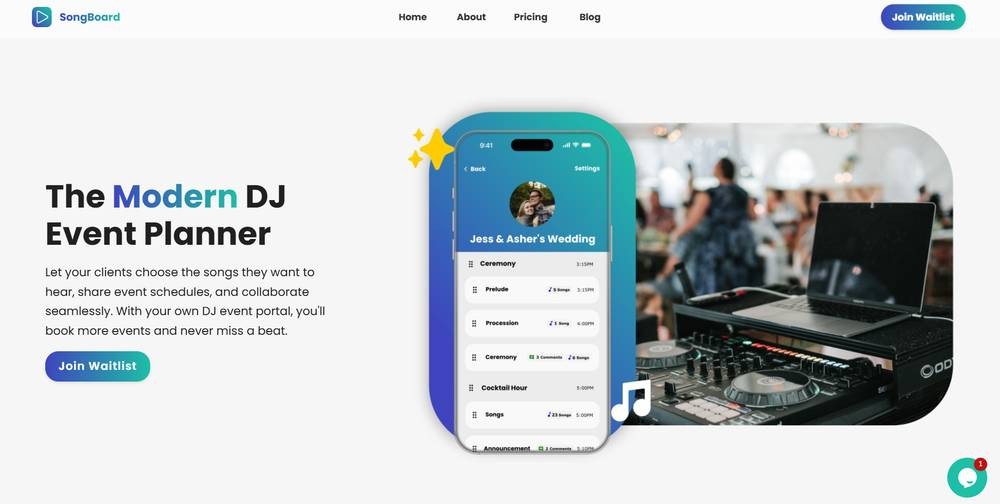
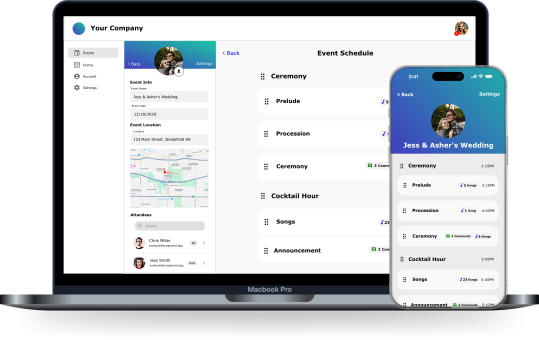
SongBoard is built around the idea that music and the event timeline should live in the same place. Every block of your event (ceremony, cocktail hour, dinner, dancing) is a Card on a Board. Each Card has its own song section where you, your client, and their guests can add songs.
That means when a bride adds "At Last" by Etta James, it goes directly onto the First Dance card—not into a generic list you have to sort through later.
Guests can also add requests to specific parts of the event. Want to let guests suggest songs for open dancing but not for the ceremony? You control that per-Card.
When you're done planning, you can export everything to a Spotify playlist or to your DJ software.
For DJs who want to skip the manual setup, SongBoard's AI assistant Tempo can generate an entire event plan with music sections, planning questions, and timeline structure from a single prompt.
Spotify Collaborative Playlists
Free, simple, and everyone already has the app. The downside: no timeline structure, no DJ control over what gets added, and no integration with the rest of your event planning. Fine for casual parties, not ideal for weddings or corporate events.
Spreadsheets
Tried and true. Google Sheets lets you build a timeline with song columns and share it with clients. Flexible, but manual. There's no song search, no streaming integration, and no guest-facing interface.
DJ-specific platforms
Tools like DJ Event Planner, Vibo, and DJ Intelligence all include music request features. Each takes a different approach to how songs are collected and organized. The key difference between these and SongBoard is whether requests are tied to specific timeline sections or dumped into a flat list.
Planning Music by Event Type
Weddings
Weddings need the most music planning because every moment has emotional weight. The processional song, the first dance, the parent dances—these are all chosen for a reason. Real wedding timelines consistently show that DJs plan for ceremony prelude, ceremony cues, cocktail hour, grand entrance, dinner, toasts, cake cutting, first dance, parent dances, open dancing, bouquet toss, and a last dance section—sometimes more.
What to plan for:
- 6–10 ceremony cue songs
- 1–2 hours of cocktail/dinner music
- 3–5 specific dance songs (first dance, parent dances, private last dance)
- 2–3 hours of open dancing music
- A last dance song (and consider a separate private last dance for just the couple)
Collect everything early. Confirm a week before. Lock it in and have backups.
Corporate events
Corporate music planning is about tone management. The music needs to match the company culture and the event's purpose. Real corporate event timelines tend to follow a networking-to-dinner-to-awards-to-dancing flow, with DJ setup happening well before guests arrive. Events like company holiday parties, real estate awards, and team celebrations all follow this pattern.
What to plan for:
- 30–60 min of networking/background music
- Walk-up tracks for awards or speakers (10–15 sec each)
- 1–2 hours of dance music (clean edits only)
- A closing song
Private parties
More flexible, fewer rules. The host usually has a genre or era preference ("80s music," "nothing country," "mostly hip-hop"). Build around their preferences and have a deep reserve of crowd-pleasers.
School dances
Current hits, clean versions, high energy. School dances are about keeping the floor moving. Build a tight 2–3 hour set of today's biggest songs with a few throwback surprises mixed in. Real prom timelines often include a social/dinner window early on, then open dancing for the bulk of the night.
Common Music Planning Mistakes
Planning music but not song placement
Having a great playlist doesn't help if you don't know which songs belong at which moments. Tie every song to a part of the event. The most organized DJs link songs directly to timeline sections—so the processional song lives on the ceremony card, not in a general list.
Over-relying on the must-play list
A must-play list is a starting point, not a setlist. You still need to read the room and adjust. If the must-play list has 40 songs for 90 minutes of dancing, you need to prioritize.
Ignoring transitions between event blocks
The shift from dinner to dancing is one of the most important moments of the night. Don't jump from background jazz to a club banger. Build a 2–3 song bridge that gradually raises the energy. Many experienced DJs handle this by scheduling a brief "transition" card between dinner and open dancing so they have a planned ramp-up.
Not confirming the do-not-play list
A must-play mistake is recoverable. A do-not-play mistake can ruin a moment. Always confirm this list and keep it visible during the event.
Not backing up your music
If your laptop dies, can you still play? Have a backup USB with your essential tracks, or use cloud-synced libraries through your DJ software.
Conclusion
Music planning for events is about connecting the right songs to the right moments—and having a system that keeps all of it organized as details change. Whether you're using a spreadsheet, a dedicated app, or a full event planning platform like SongBoard, the goal is the same: show up to the event knowing exactly what to play and when.
The DJs who invest time in their planning workflow end up spending less time scrambling and more time performing. And that's what clients actually pay for.
Read the Latest From SongBoard
![Best Music Planning App for DJs: Event & Wedding DJs [2026]](/blog/best-music-planning-app-for-djs/thumbnail.jpg)
![How to Plan Music for Any Event: A DJ's Guide [2026]](/blog/event-music-planning/thumbnail.jpg)
![How to Start and Grow a Mobile DJ Business [2026 Guide]](/blog/mobile-dj-business-guide/thumbnail.jpg)
![How to DJ a Corporate Event: The Complete Guide [2026]](/blog/how-to-dj-a-corporate-event/thumbnail.jpg)
![How to Create the Perfect Wedding DJ Timeline [Step-by-Step]](/blog/wedding-dj-timeline/thumbnail.jpg)
![Best DJ Song Request Apps for 2026 [Ranked]](/blog/best-dj-song-request-apps/thumbnail.jpg)
Join Our Mail List 📃
Hear the latest from SongBoard, right as it happens. We'll send out an email for any major updates, and discount offers.We will never spam you or sell your information, and you can always opt-out at any time using the link at the bottom of any email.


© 2026 SongBoard. SongBoard is a trademark of SongBoard LLC. All rights reserved.